


Quick Answer:
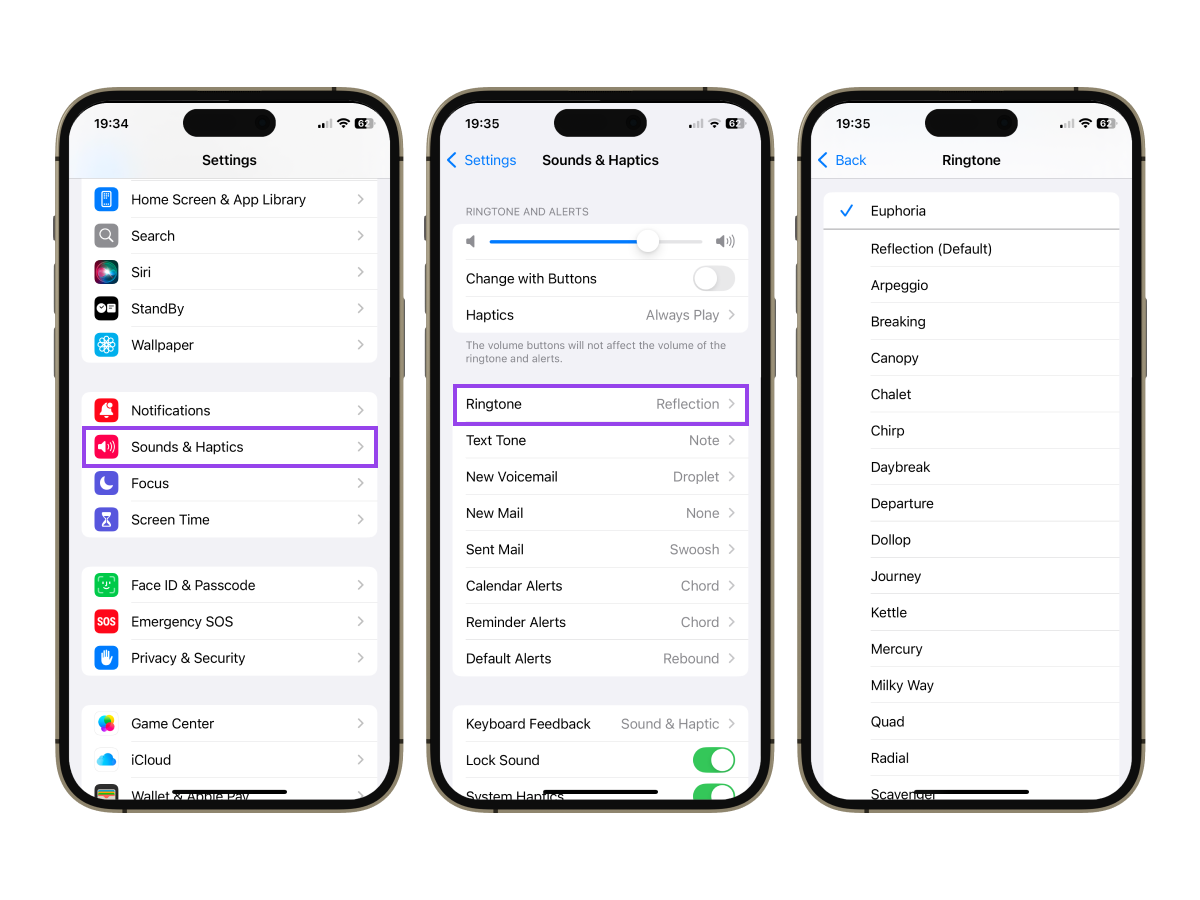
- iPhone: Settings → Sounds and Haptics → Ringtone, tap a tone to select it.
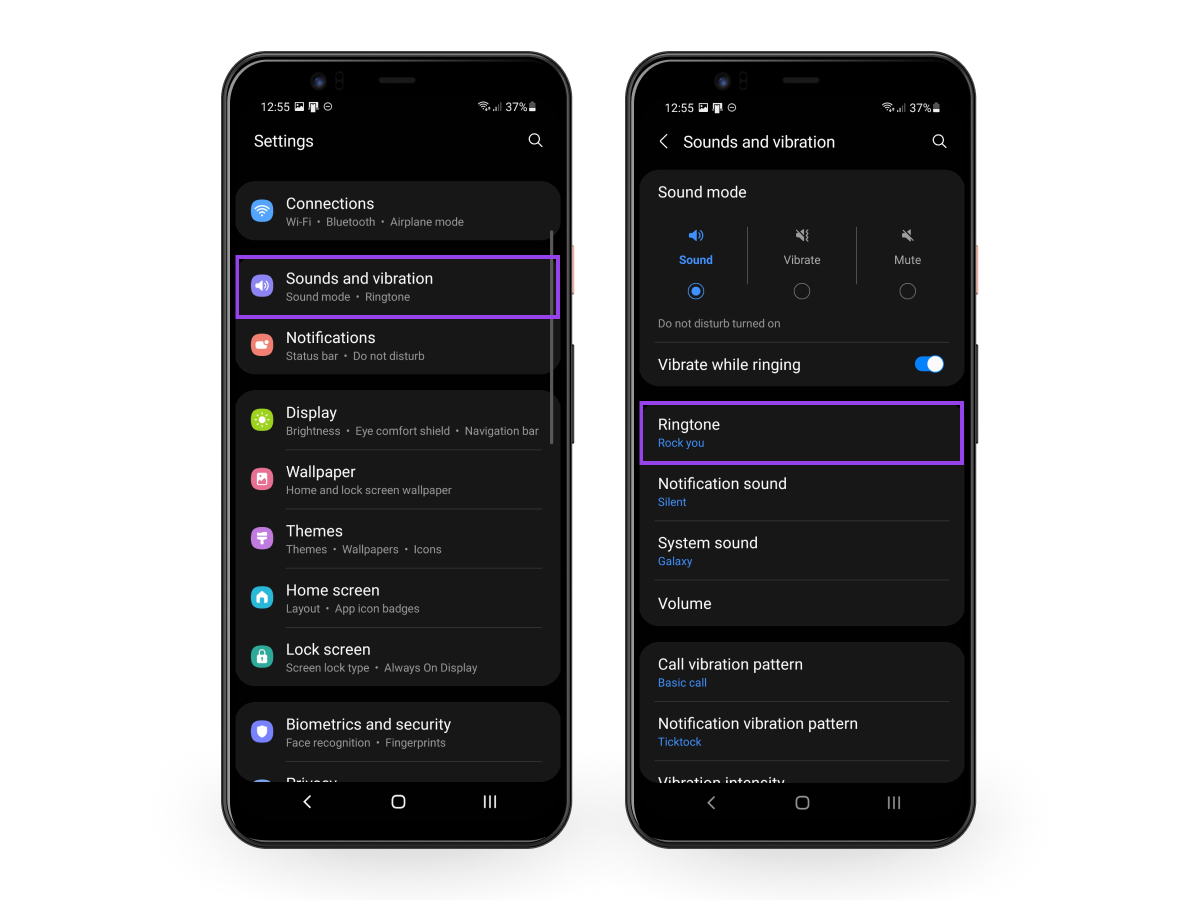
- Samsung Galaxy: Settings → Sounds and vibration → Ringtone, pick a tone and tap Back.
- Google Pixel: Settings → Sound & vibration → Phone ringtone, choose a tone and tap Save.
- Other Android (OnePlus, Xiaomi, Motorola): Settings → Sound (or Sound & notification) → Phone Ringtone, choose a system tone or tap Add for a custom file.
How to Change Ringtone on iPhone
The steps below use current iOS labels. Apple uses "Sounds and Haptics," not "Sounds" alone.
- Open the Settings app.
- Tap Sounds and Haptics.
- Tap Ringtone.
- Tap any tone to preview it.
- Tap your preferred tone to select it. A checkmark confirms the choice.
Your new ringtone is now set. No reboot needed.
How to Change Ringtone on Android
Steps vary slightly between manufacturers. Here is a breakdown by the most common devices.
Samsung Galaxy
- Open Settings.
- Tap Sounds and vibration.
- Tap Ringtone.
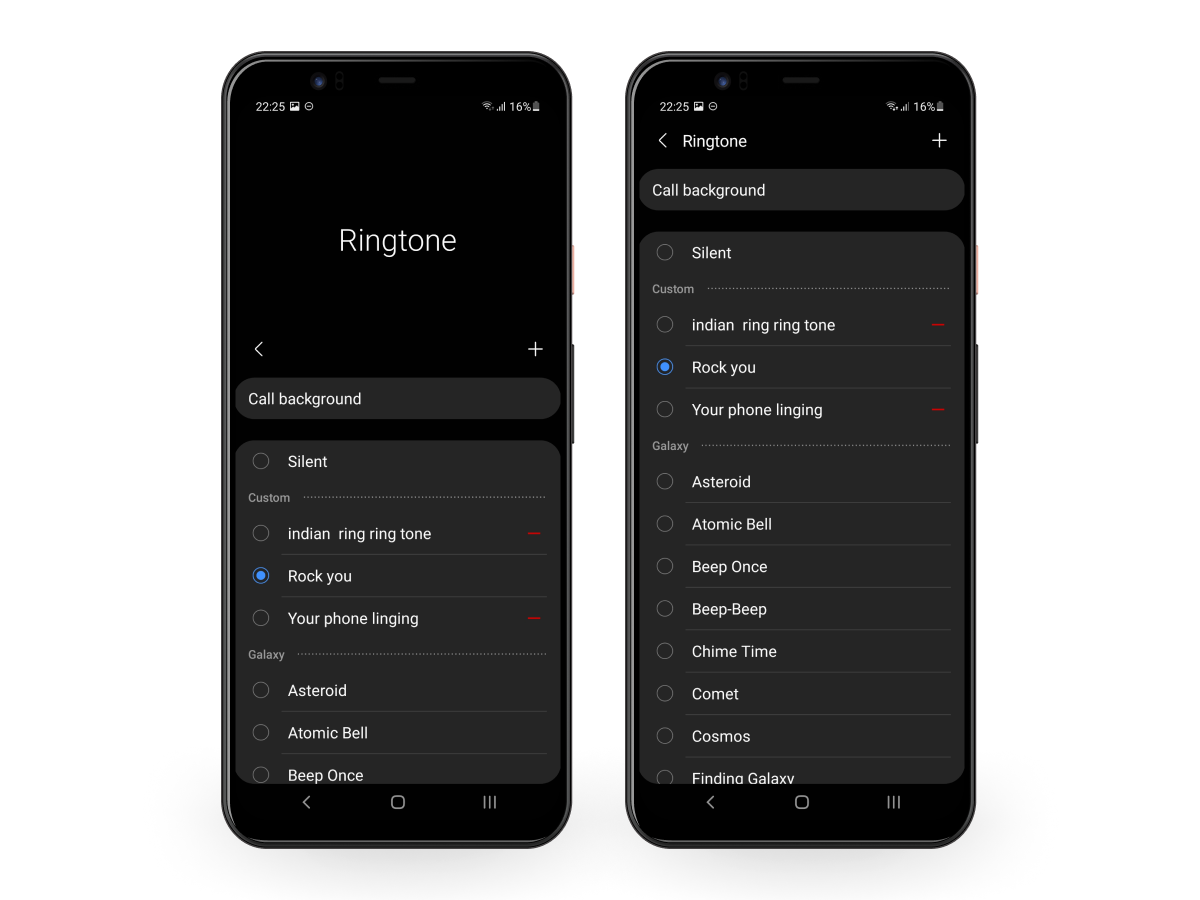
- Select a tone from the list.
- Tap Back to confirm.
Google Pixel
- Open Settings.
- Tap Sound & vibration.
- Tap Phone ringtone.
- Select a new ringtone from the list.
- Tap Save.
Other Android Phones (OnePlus, Xiaomi, Motorola and others)
General steps that work on most Android devices:
- Open Settings.
- Tap Sound or Sound & notification.
- Tap Phone Ringtone.
- Select from system tones or tap Add to upload a custom sound.
Menu labels differ slightly across brands, but the path through Settings and Sound gets you there on any Android. For control over alerts, add a notification app for Android.
How to Set Any Song as Your Ringtone
On iPhone
Option 1: Buy from the Tone Store
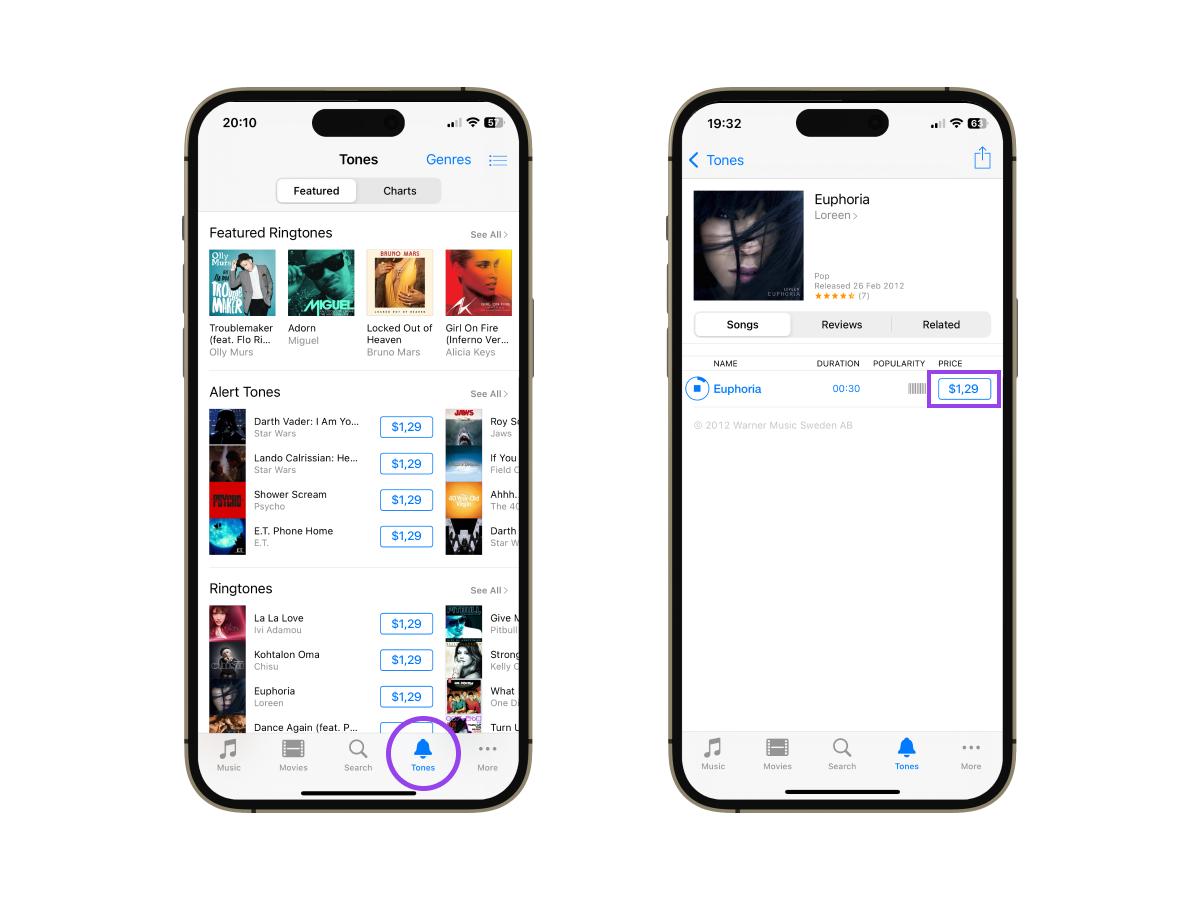
Apple's ringtone store is now called the Tone Store. It is built into the Settings app.
- Open Settings.
- Tap Sounds and Haptics, then Ringtone.
- Tap Tone Store at the top of the list.
- Search for a tone, tap to preview it, then tap the price to purchase.
- Once purchased, it appears in your ringtone list automatically.
Option 2: Make a custom ringtone on iPhone with GarageBand (free)
This method lets you use any song already on your iPhone as a custom ringtone, and it's one of several ways to get free ringtones on iPhone.
- Open GarageBand and start a new project.
- Import or record the track you want.
- Trim it to 30 seconds or less.
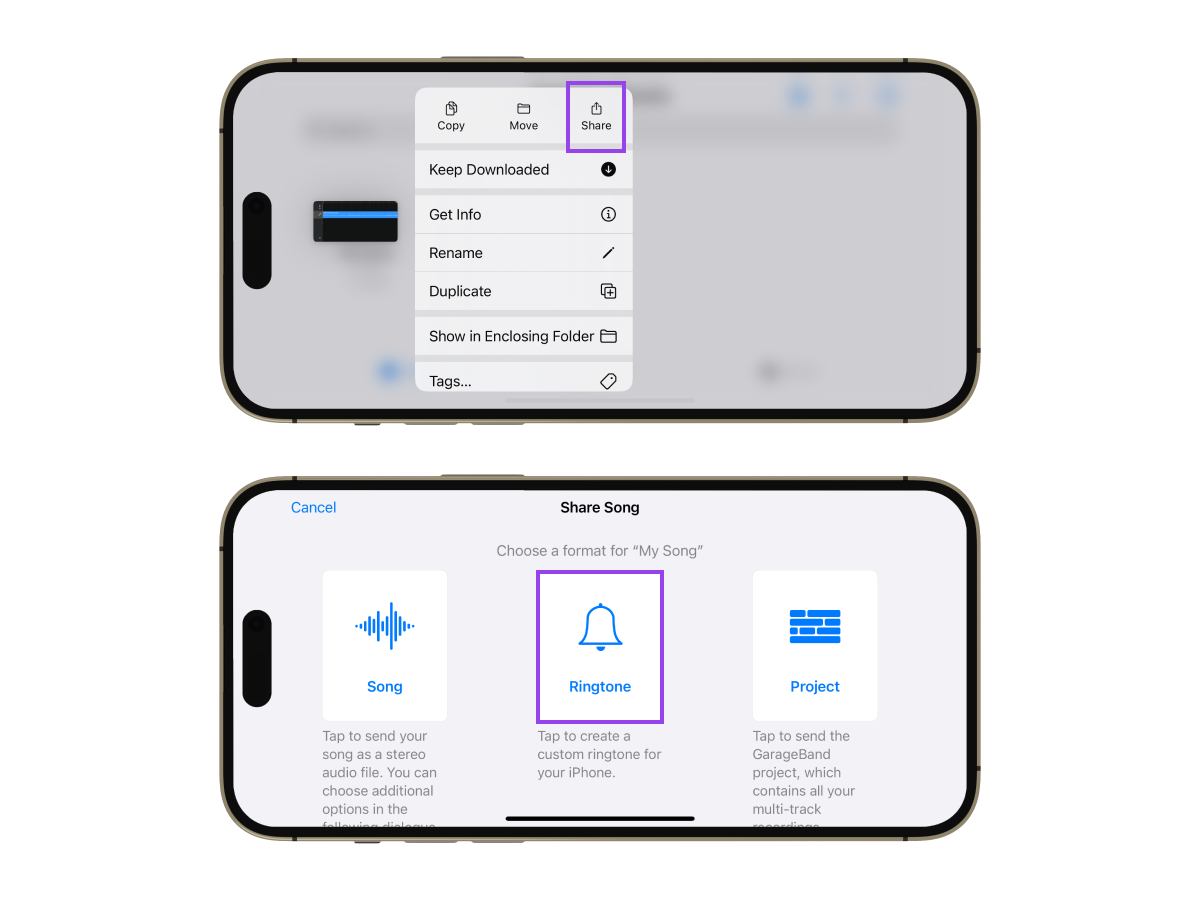
- Tap the share icon.
- Select Ringtone, name your tone, then tap Export.
- The tone now appears in Settings under Sounds and Haptics, then Ringtone.
On Android
- Download the MP3 to your phone.
- Go to Settings, then Sound and vibration, then Ringtone.
- The file appears in the list under internal storage. Tap it to select.
If you want to trim the song first, any free audio cutter app from the Play Store can do that before you set the ringtone.
How to Set a Ringtone for a Contact
Assigning individual tones means you know who is calling before you look at the screen. For a full library of contact ringtones, Zedge has a dedicated category.
On iPhone
- Open the Contacts app or go to Phone, then Contacts.
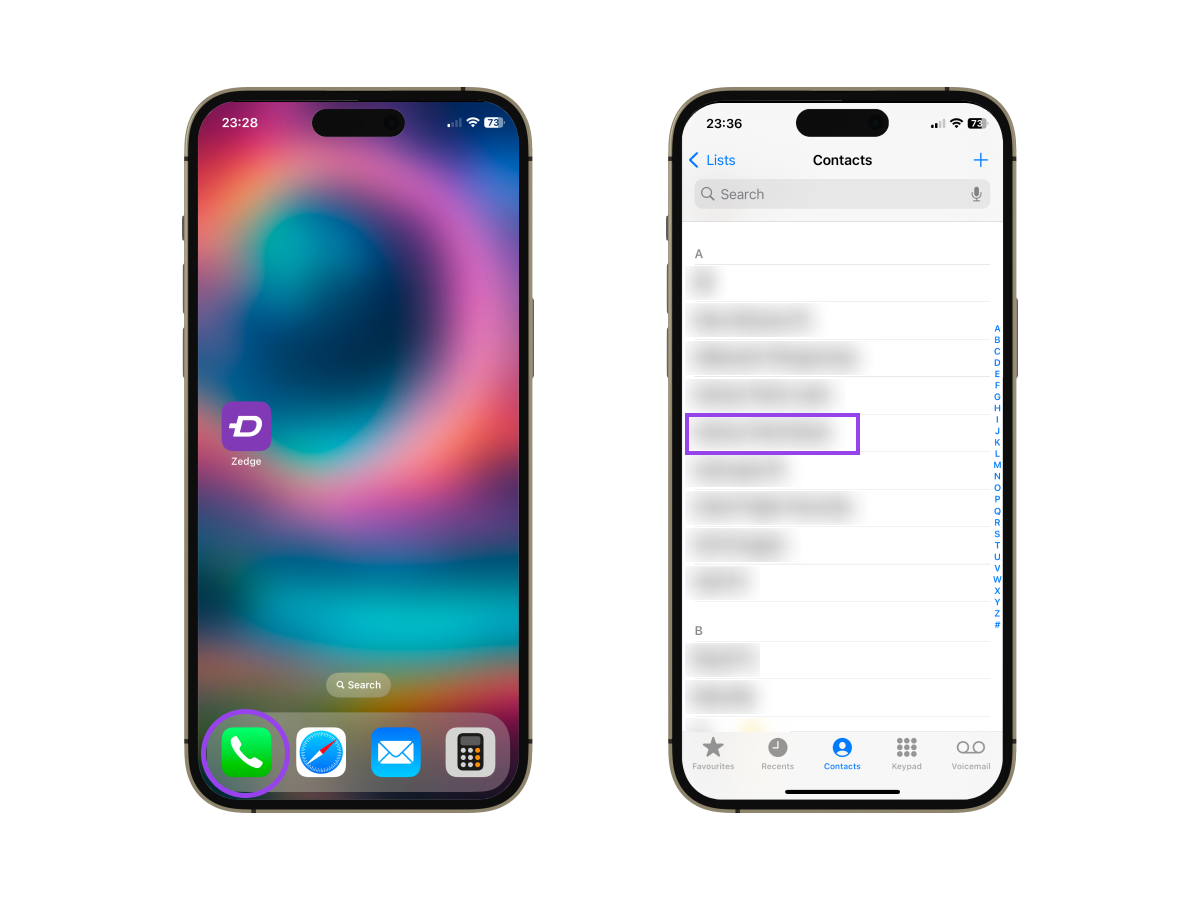
- Select the contact.
- Tap Edit.
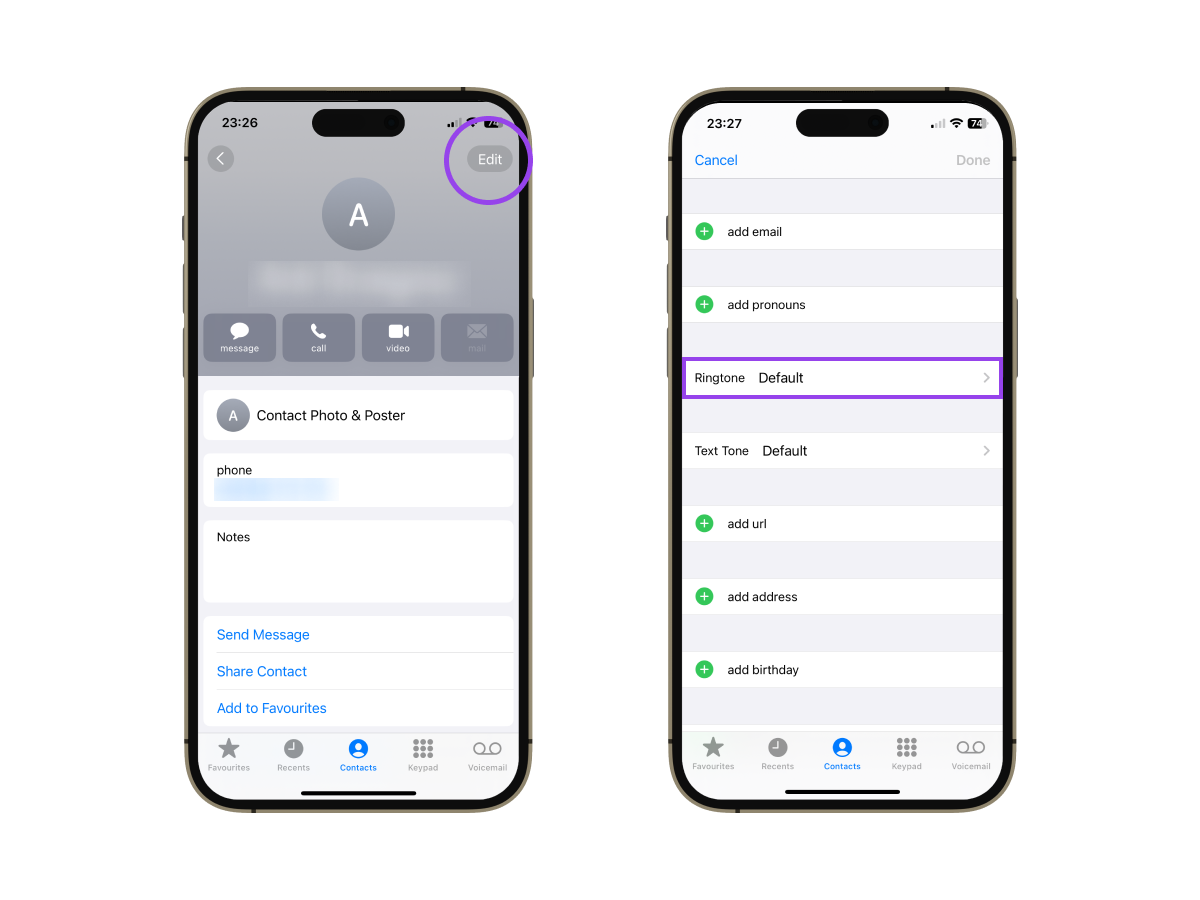
- Tap Ringtone.
- Choose a tone from the list and tap Done.
- Tap Done again to save the contact.
On Samsung
- Open the Contacts app.
- Tap the contact.
- Tap Edit (pencil icon).
- Scroll down and tap View more if needed.
- Tap Ringtone.
- Pick a tone or tap Add from phone to use your own file.
- Tap Save.
On Google Pixel
- Open the Contacts app.
- Select the contact.
- Tap the three-dot menu in the upper right corner.
- Tap Set ringtone.
- Choose a tone from the list or go to My Sounds to pick a custom file.
- Tap the checkmark to confirm.
The Fastest Way: Set Ringtone with Zedge
If you do not want to dig through Settings or convert files, Zedge is the shortcut, and it is one of the top ringtone apps for Android and iPhone. You can browse thousands of free ringtones by genre, mood, or category, preview them, and set one directly from the app without any file handling.
On Android:
- Download the Zedge app from Google Play.
- Open Zedge and tap Ringtones.
- Browse or search for a tone and tap to preview.
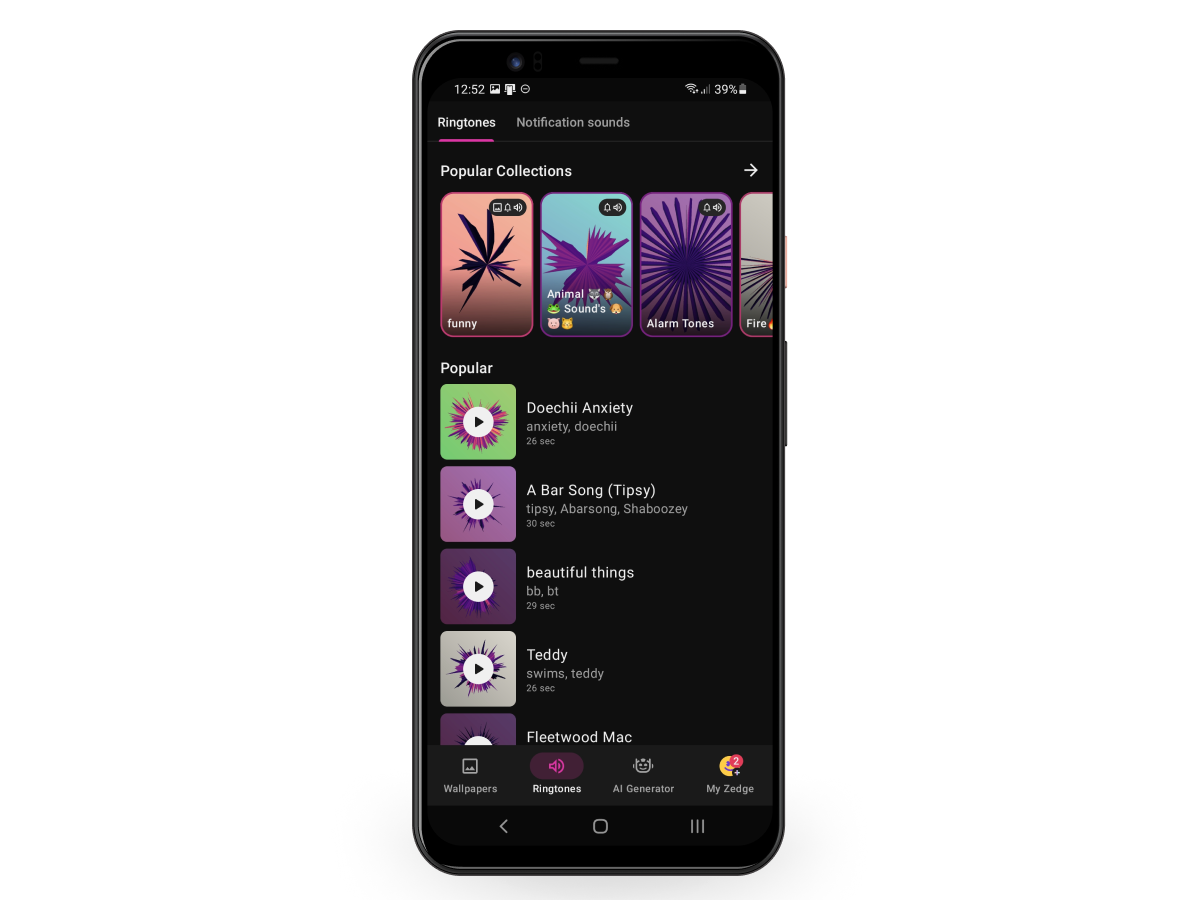
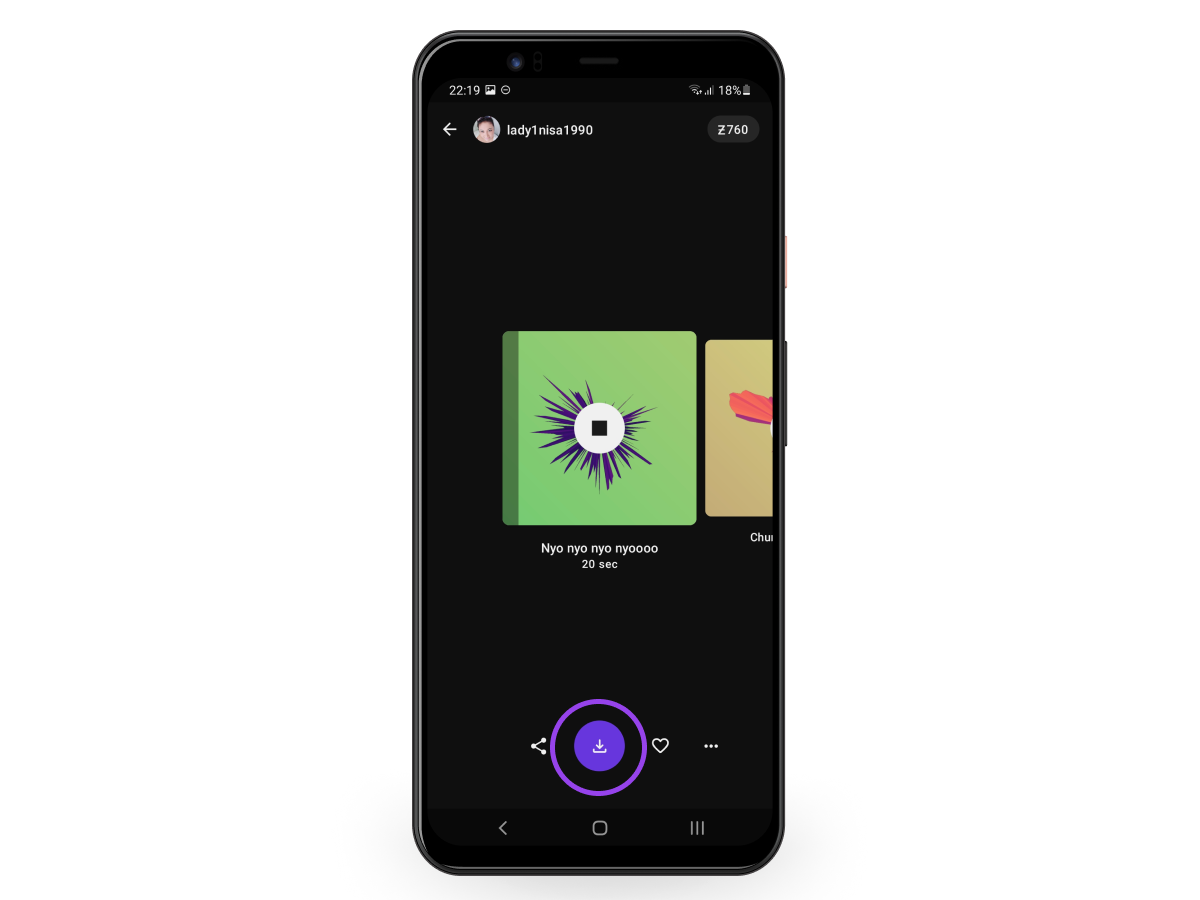
- Tap the download icon.
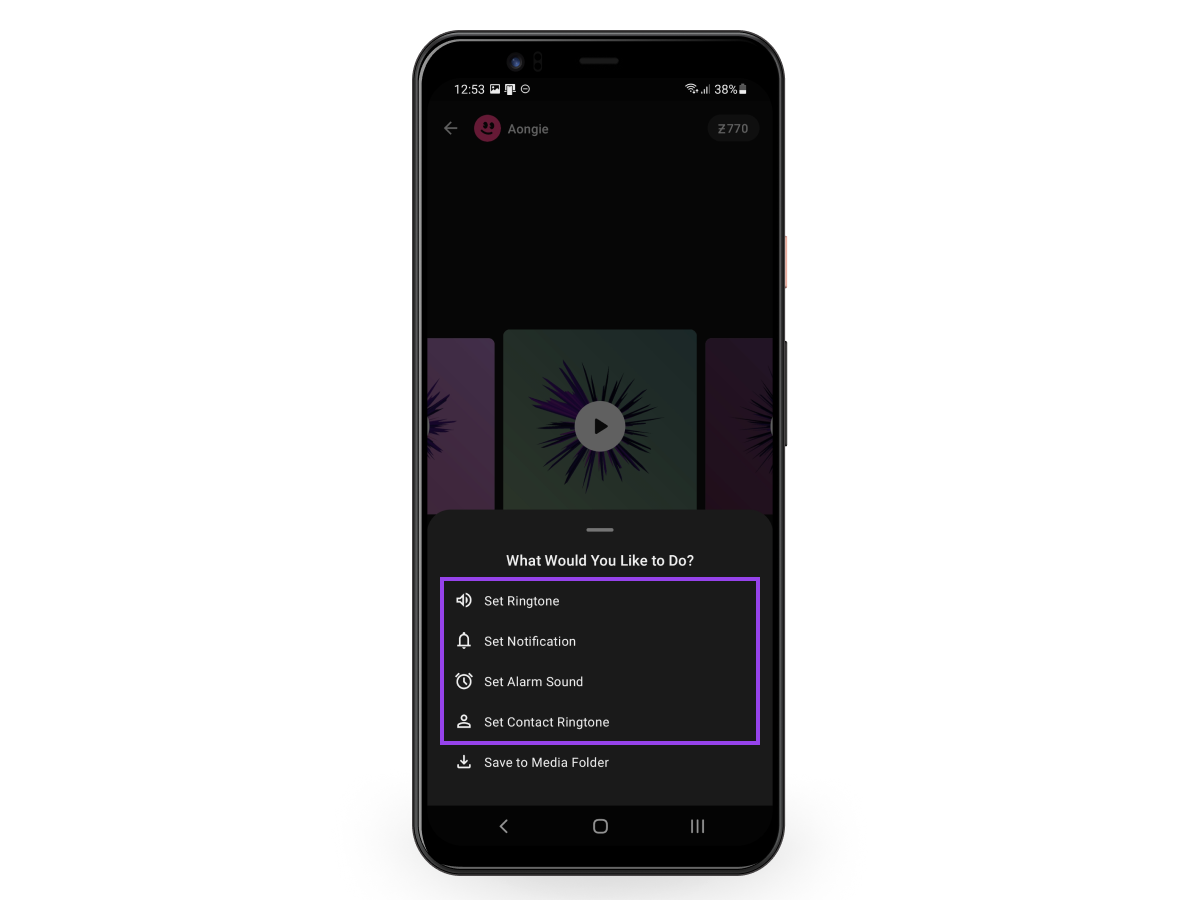
- Tap Set and choose Ringtone, Notification, or Contact.
On iPhone:
- Download the Zedge app from the App Store.
- Open Zedge and tap the menu icon.
- Select Ringtones.
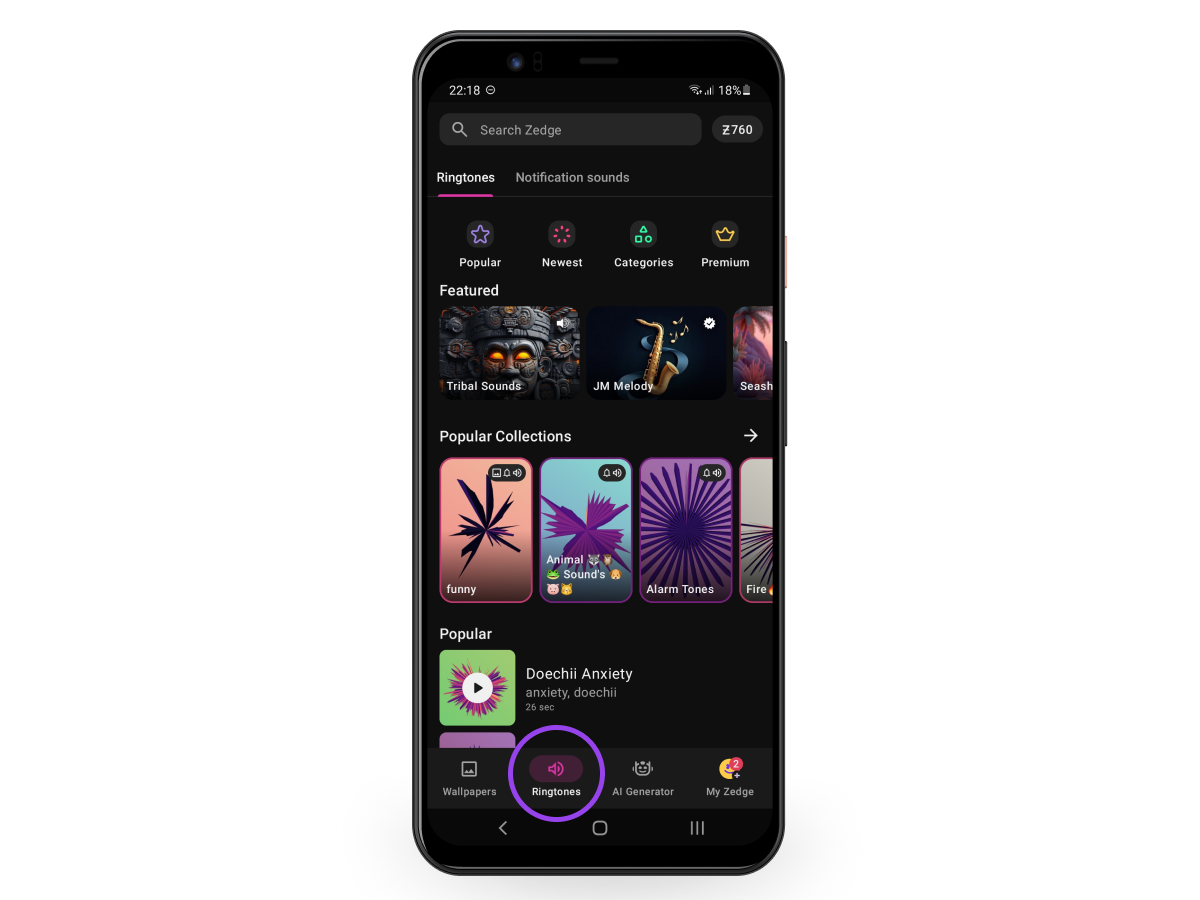
- Browse or search, then tap to preview.
- Tap the download icon.
- Tap Set and choose Ringtone, Notification, or Contact.
Conclusion
Changing your ringtone takes under a minute once you know the path. If your tone is not playing after setup, why your iPhone isn't ringing usually comes down to a volume or focus setting, not the ringtone itself. If your style runs more specific, best anime ringtone apps has options worth browsing. Still picking between apps? Zedge vs Mobcup lays out the differences.
And if you want to keep personalizing your phone, how to change your iPhone wallpaper is the next guide you should jump on.
Ready to set the tone? Get Zedge Now.
Most Popular Ringtones for iPhone and Android
FAQ
How do I change my ringtone to any song? On iPhone, open the Tone Store in Settings under Sounds and Haptics, then Ringtone, and purchase the track. Or use GarageBand to trim and export any song for free. On Android, download the MP3 to your phone, then go to Settings, Sound and vibration, Ringtone, and select it from the list.
How do I change my phone's ringtone? On iPhone, go to Settings, then Sounds and Haptics, then Ringtone, and tap a tone to select it. On Android, go to Settings, then Sound and vibration, then Ringtone, and choose a new tone. The path is slightly different on Samsung versus Pixel, but both start in Settings.
How do I put custom ringtones on my iPhone? Use the Tone Store to buy one directly from Settings, or use GarageBand to trim any track on your phone and export it as a ringtone. Once exported from GarageBand, it appears automatically in your ringtone list under Sounds and Haptics.
Where are ringtone settings? On iPhone, ringtone settings are in Settings, then Sounds and Haptics, then Ringtone. On Android, they are in Settings, then Sound and vibration, then Ringtone. Samsung labels it Sounds and vibration; Pixel and most other Android phones use Sound and vibration.
How do I change the ringtone on Android? Go to Settings, then Sound and vibration, then Ringtone, and select a new tone. On Samsung the path is Settings, then Sounds and vibration, then Ringtone. Tap the plus icon to add a custom audio file from your phone.
How do I set a song as my ringtone on Android? Download the MP3 to your phone, then go to Settings, Sound and vibration, Ringtone, and select it from the list. Alternatively, download Zedge and set a tone directly from the app without moving any files.
How do I change the ringtone on my Samsung? Go to Settings, then Sounds and vibration, then Ringtone. Select a system tone or tap the plus icon to add a custom file from your phone. To remove a custom tone, tap the red minus icon next to it.
How do I set my own ringtone? On Android, add your audio file to the Ringtones folder and select it in Settings. On iPhone, use GarageBand to export any track as a ringtone, or buy one from the Tone Store. Zedge lets you browse, download, and set ringtones on both platforms without any file management.