

"Google background change" usually means customizing the image behind Google's New Tab page in Chrome. Here is how to change Google background on desktop: open a new tab, click Customize Chrome at the bottom right, choose Change theme, then upload your own image or pick a preset. On phones, you change it in the Google app or Chrome settings.
Key Takeaways
- A "Google background" most commonly refers to the Chrome New Tab page background, not the google.com homepage.
- On the desktop, the path is: new tab, Customize Chrome, Change theme.
- You can upload any high-resolution image as your background.
- To reset, go back to Customize Chrome and restore the default.
What Is a "Google Background"?
"Google background" refers to three different things depending on what you are using, and the confusion is worth clearing up before you start.
The most common meaning is the background image on Chrome's New Tab page. Every time you open a new tab in Chrome on a computer or phone, you see a background. That is what most people are trying to change.
The second meaning that sometimes comes up is a Pixel phone wallpaper. That is a different feature entirely: it is your phone's home screen or lock screen background, controlled through Android settings, not through Chrome or Google. This guide does not cover Pixel wallpapers.
This guide covers two Chrome and Google surfaces: the Chrome New Tab background on desktop, and Chrome on mobile.
How to Change Your Google Background in Chrome (Desktop)
Changing the Chrome New Tab background takes about thirty seconds. Open a new tab in Chrome. In the bottom right corner, click the Customize Chrome pencil icon. A sidebar opens on the right side of the screen.
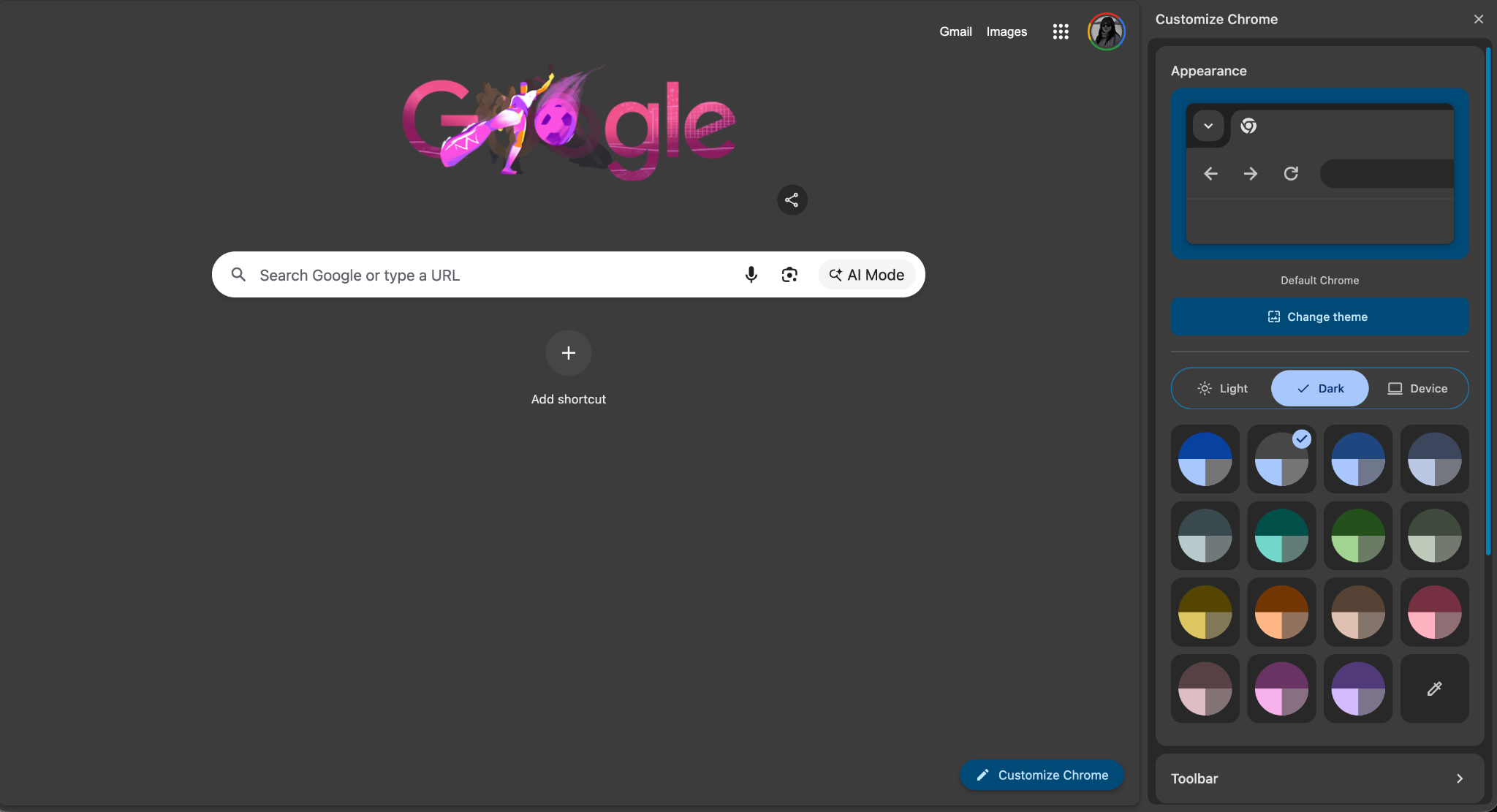
Inside the sidebar:
- Click Change theme.
- Choose one of three options:
- Upload an image: Select any image file from your computer. It applies immediately as your New Tab background.
- Preset collections: Browse Google's curated sets, organized by category (landscapes, art, solid colors, and more). Click a thumbnail to preview it.
- Chrome Web Store: Click Explore themes to install a full google chrome theme, which changes the background, browser toolbar color, and tab styling together.
- Click Done to close the sidebar.
Changes apply instantly. You can switch between backgrounds as often as you like.
The fastest way to change google chrome background is the Upload option: no browsing required. If you prefer a preset, the built-in collections in Chrome's customize background and theme guide include a wide range of categories to browse. The customize Chrome new tab panel also lets you change shortcuts and color separately from the background.
How to Change Your Google Background on a Phone
Here is how to change Google background on a phone: mobile options are more limited than desktop, but both Android and iPhone Chrome expose background presets on the new tab page.
Chrome on Android and iPhone:
- Open Chrome and tap a new tab.
- Tap the Customize button at the top of the new tab page.
- Select a background image from the available presets, or tap Upload image to use your own photo.
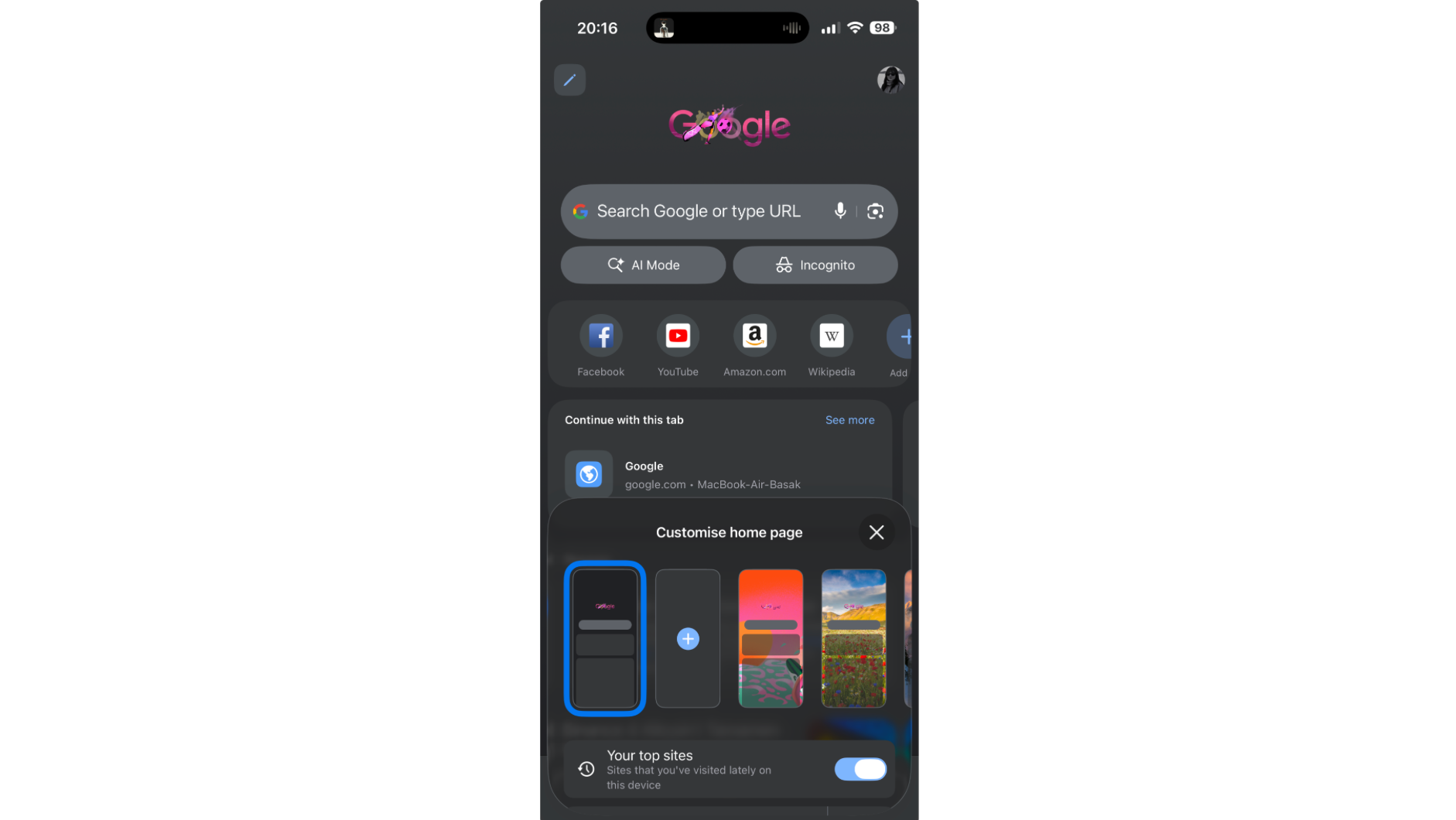
Not all versions of Chrome on mobile show the Customize button. If it is missing, the background options are not available in that version. The New Tab page on mobile defaults to a Google Doodle or a plain background depending on your Chrome version.
Google app on Android:
The Google app's appearance settings (dark mode, light mode) control the look of the search interface but do not change a background image in the same way as desktop Chrome.
Dark mode is available on both platforms through Chrome Settings, then Appearance, then Theme. It changes the browser chrome and new tab color but is not the same as setting a background image.
Use Your Own Image as a Google Background
Any high-resolution image can become your Chrome New Tab background. The process is the same as the desktop steps above: Customize Chrome, Change theme, Upload an image, then select the file from your computer.
For the best result, choose an image that is at least 1920x1080 pixels. Lower-resolution images stretch and look soft. Keep the subject away from the center of the image, where your search bar and shortcuts sit. Calm images with simple compositions work better than busy ones, since text and icons need to stay readable against the background.
For free high-resolution images to use as your Chrome background, wallpaper download sites are the most practical starting point. Download the image to your computer first, then upload it through Customize Chrome. Zedge is one source for phone wallpapers that can double as browser backgrounds.
How to Reset or Remove Your Google Background
To reset your Chrome New Tab background to the default:
- Open a new tab and click Customize Chrome.
- Click Change theme.
- Click Restore default.
If you installed a Chrome theme from the Web Store, go to Settings, then Appearance, then Reset to default to remove it.
Dark mode is not the same as a background image. Dark mode changes the color of Chrome's interface (toolbar, tabs, and new tab page) to dark gray or black. It does not add or remove a background image. You can have dark mode on and still have a custom background, or neither, independently.
Frequently Asked Questions
Why don't I see a Customize button on my new tab?
If the Customize Chrome button is missing, Chrome may not be updated to the latest version, or you may be in Incognito mode. Incognito tabs do not support background customization. Update Chrome in Settings, then About Chrome, then try again in a regular tab.
How do I add my own picture as a Google background?
Open a new tab, click Customize Chrome, then Change theme, then Upload an image. Select your image file and it applies immediately. For images to use, you can find free wallpapers and images and download them before uploading through the Customize Chrome panel.
Is a background the same as a Chrome theme?
No. A background is the image behind your New Tab page shortcuts. A Chrome theme changes the background plus the toolbar color, tab styling, and frame. Themes are installed from the Chrome Web Store through Customize Chrome. You can set a background without installing a full theme.
How do I change my Google background on my phone?
Open Chrome, tap a new tab, and look for the Customize button at the bottom of the page. Tap it to choose a preset or upload your own image. The option is not available in all versions of Chrome on mobile. If the button is missing, your version of Chrome does not expose background customization on that device.
Find Images for Every Screen
A great background starts with the right image. Download the Zedge app to find wallpapers and images for your phone, and use any of them as your Chrome background too. Free with ads; Premium removes them. Download Zedge.